
Origin
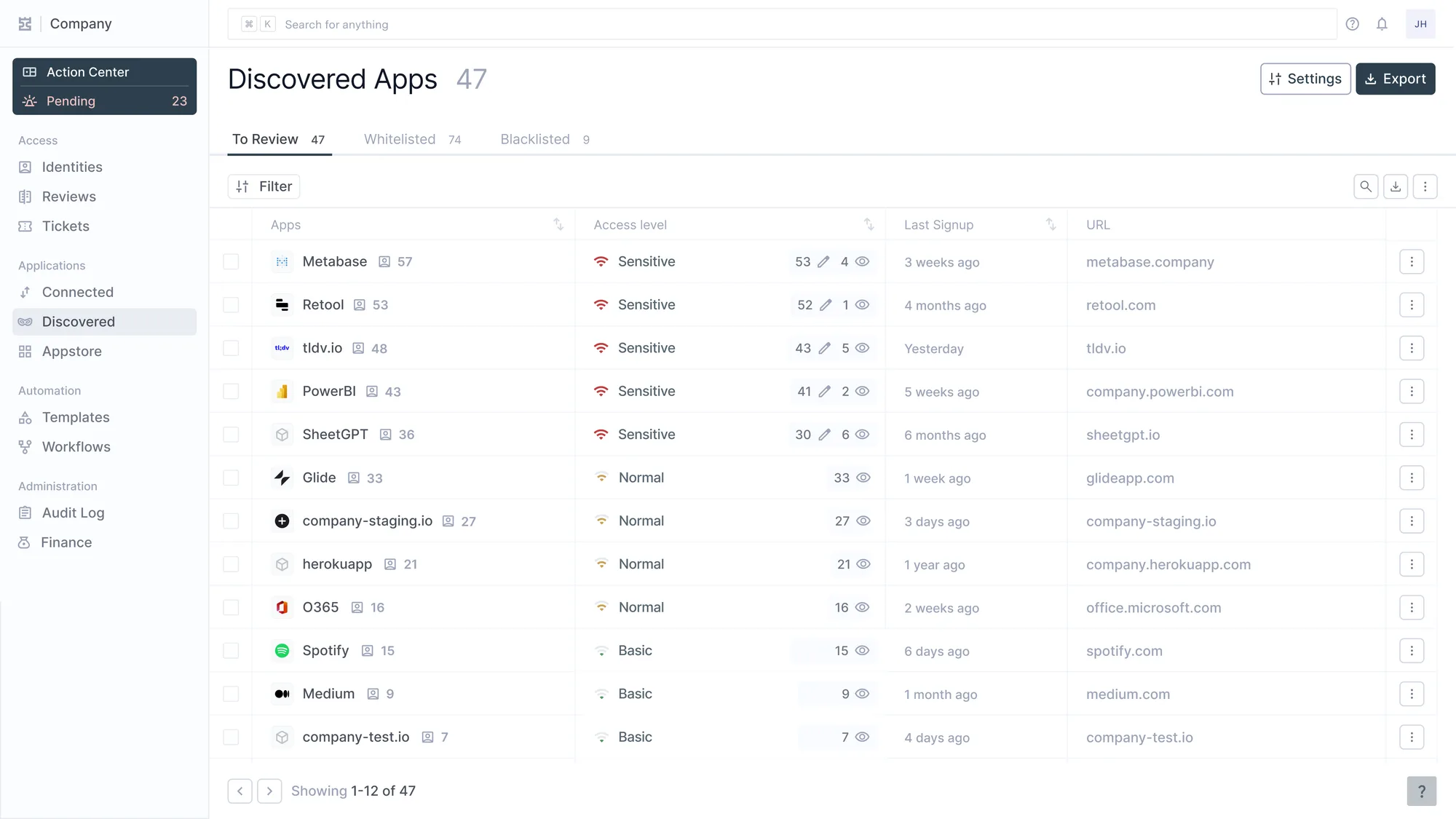
In January, Pranay, Anchit and Ron connected Iden to the Google Workspace of a database startup for a proof of concept. Like most startups, they had a simple policy on SaaS: let people sign up for whatever they need. Nobody had ever counted what that added up to.
When the list of discovered apps loaded, someone on their side read the number out loud.
"Wow, we have 163. I didn't know we have so many."
Someone else said it was a lot more than 10. Then someone explained the policy: right now, they just allow people.
It's a fine policy for a startup. And 163 apps going from nowhere to a list felt like the job was done. We wrote in May about what that first scan feels like. This is about what comes after it.
Every app at your company is either known to IT or not. And it's either governed or not, where governed means accounts in it get created and removed through a process, not through someone's memory. That second axis is the difference between SaaS management and identity governance.
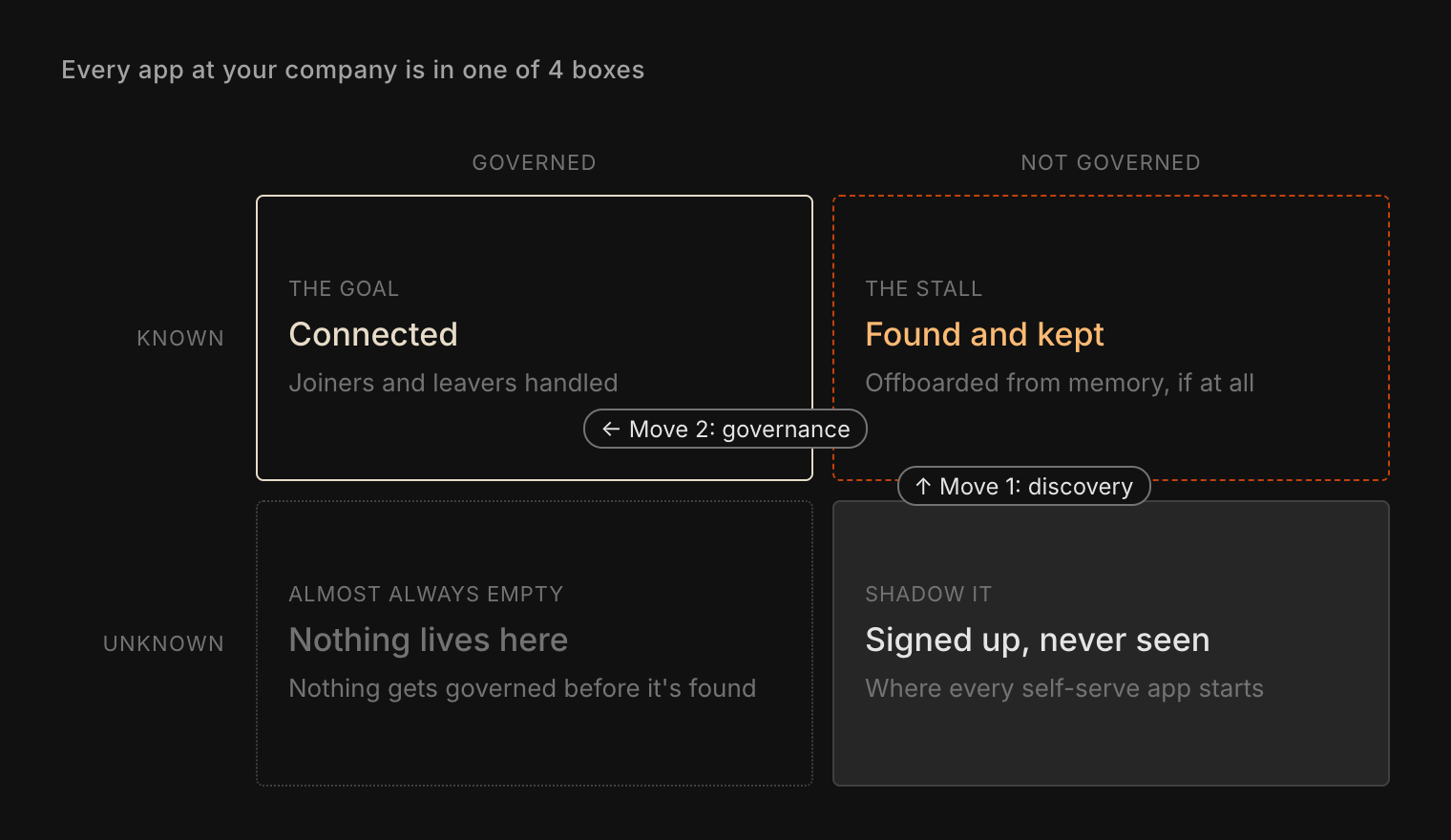
Discovery moves an app up. Governance moves it across. The startup made the first move that afternoon. The second is the one most teams never make.
Move 1 is the easy one
Finding apps takes a few days if you look at what's still connected rather than at logs, because logs expire and a grant that's still in use is listed however old it is. The grants list in Google or Entra catches every app someone signed into with Google or Microsoft. Welcome emails catch the password and magic-link signups, the card feed catches what someone paid for, and the managed browser report catches the extensions.
None of them sees a personal account on a personal laptop. That one stays bottom right. The exact queries are in the checks at the end.
Move 2 is where apps get stuck
Once you have the list, triage is quick. Retire what nobody uses. Fold the second whiteboard tool into the one you already pay for. Keep the rest, and give each one an owner.
Then comes the move across, and it stalls for a mechanical reason. Every app on a discovery list was bought self-serve, on whatever plan one person could put on a card.
Take 20 apps that turn up on nearly every discovery list, and check them against the SCIM Tax Index: Notion, Miro, Canva, Loom, Calendly, Grammarly, ChatGPT, Zoom, Dropbox, Airtable, Figma, Trello, Asana, ClickUp, Zapier, Typeform, Lucidchart, Cursor, Smartsheet and Todoist. 1 of the 20 includes SCIM on the plan a team buys with a card. 15 keep it on an Enterprise plan, and 13 of those don't publish the price. Across the whole index it's much the same: of the 719 vendors whose plans we could confirm, 48 include SCIM on the standard plan, about 1 in 15.
So for each app it keeps, a team has 3 choices, usually made without saying so:
- Pay to upgrade, which we've called the SCIM tax. Figma has no SCIM on Professional. Moving 25 full seats to Organization, at $16 and $55 a seat on annual billing, costs $11,700 more a year, for one app.
- Write the app down as a manual step on the joiner and leaver checklists, with a named owner.
- Leave it where it is.
Those odds make the first choice expensive and the second slow, so the third is what happens when nobody decides. Say the startup kept 80 of its 163 apps. At 1 in 15, about 5 could be provisioned through SCIM on the plan they already pay for. The other 75 are a decision someone has to make, one app at a time.
Left alone, a year later nobody remembers the app was found. Nothing changed in the app. What changed was the team's memory of it, and the top row of the 2x2 was only ever that. It's bottom right again.
Blocking moves apps the wrong way
The usual reaction to a long list is to block more. Some apps deserve it, like one holding Gmail read access for half the sales team.
As a default, though, blocking doesn't move apps across. It moves them down. People who can't use an app with their work account use it with a personal one, and a personal account is the one thing none of the checks below can see.
Iden makes both moves. It finds the apps people signed up for. For the ones you keep, it creates and removes accounts on the plan the app is already on, whatever that plan supports, down to working the admin console when there's nothing else. That last path is the one we repair when a vendor redesigns its pages.
The startup's policy, allow people, can stay. It just needs the second move: when someone leaves, who removes them from the apps you kept?
The checks
- Google grants: the Directory API's
tokens.listreturns every app a user has authorized and still holds a token for. GAM'sprint tokensruns it for the whole domain. Google drops refresh tokens unused for 6 months (Google). - Entra grants:
Get-MgOauth2PermissionGrant -All, plus the Enterprise applications list. - Exchange Online:
Get-MessageTraceV2with a subject that starts with "Verify" or "Welcome to". It covers 90 days, 10 days per query and up to 5,000 rows each, so 90 days is 9 queries. - Gmail: Email log search covers 30 days. Gmail log events in the security investigation tool keep 6 months on Enterprise, Frontline and Education editions, not Business Plus.
- Spend: export the vendor list from your card or expense tool.
- Chrome: the apps and extensions usage report lists extensions on managed profiles. Turn on browser reporting first.
- Usage, for triage: Google's OAuth log keeps 6 months (Google). Entra's sign-in logs keep 30 days on P1 and P2, and 7 on Free, unless exported (Microsoft Learn). Ask the owner before retiring anything used quarterly.
- Consent: changing Entra's user consent setting only affects new grants (Microsoft Learn). To cut off an existing app, disable sign-in for it or require assignment. Removing the grants themselves takes Graph or PowerShell.
- Figma: Organization's SCIM creates and removes users. Setting seat types through SCIM needs Enterprise.
We'd run discovery against your tenant and tell you, app by app, which of the ones you'd keep we can govern on the plan you already pay for. No deck. Just the product.