
Origin
In August Anchit, one of our co-founders, spent an afternoon with the IT lead at a regional distribution company of about 700 people. Every October they hire around 200 pickers and drivers for the holiday peak. They were planning this year's wave and wanted to know why last year's was still signing in.
We started in the Entra sign-in logs, looking for anything from last year's seasonal hires after their last shift. The first one we found was a picker whose contract ended on 22 December. She'd signed in to Teams on her phone on 9 February, to read the shift-swap chat she'd been part of all winter.
HR had entered her end date in Workday on the day she was hired. Her Active Directory account had expired on 23 December, on schedule, without anyone touching it. By the standard most IT teams would apply, that's a well-run offboarding. It just hadn't reached the place she was still signing in.
Most offboarding is built to react to an event. Someone resigns. There's a letter, a conversation with a manager, a last day on the calendar, a farewell message in the team channel. HR keys a termination, and the termination sets everything else moving: the ticket to IT, the disable in the directory, the checklist, the laptop coming back.
A seasonal contract doesn't produce that event. The picker works her last shift and doesn't come back in January, because that was always the plan. Nobody resigns. There's no conversation and no ticket. To every system waiting for a termination, nothing has happened.
The termination does arrive eventually, when somebody gets round to keying it. At the distributor, store managers send HR a list of who has finished, and in the middle of the peak that list is nobody's priority. Last season's final batch went in during March. Until then, every system that waited for a termination saw 200 people who still worked there.
So the workers whose last day the company knew furthest in advance were the ones whose access stayed open longest. Offboarding that waits for news will always miss a contract that ends on schedule, because that contract never makes any.
Contractors, interns and fixed-term hires leave the same way. Most companies have more of them than they count, and most of them have an end date sitting in a field somewhere that no system acts on.
Some teams have seen this coming and put the date to work. Mapping Workday's contract end date to accountExpires in Active Directory is Microsoft's own documented example, and the distributor had done exactly that. HR enters the date once, at hire, and the directory enforces it without anyone running anything.
The trouble is where the directory's enforcement stops. Under password hash sync, which is the default for hybrid Entra, Microsoft's documentation says accountExpires "isn't synchronized to Microsoft Entra ID," so an expired AD account "will still be active in Microsoft Entra ID." Pass-through authentication and AD FS check AD at sign-in, so they don't have this problem. Most hybrid shops don't run them.
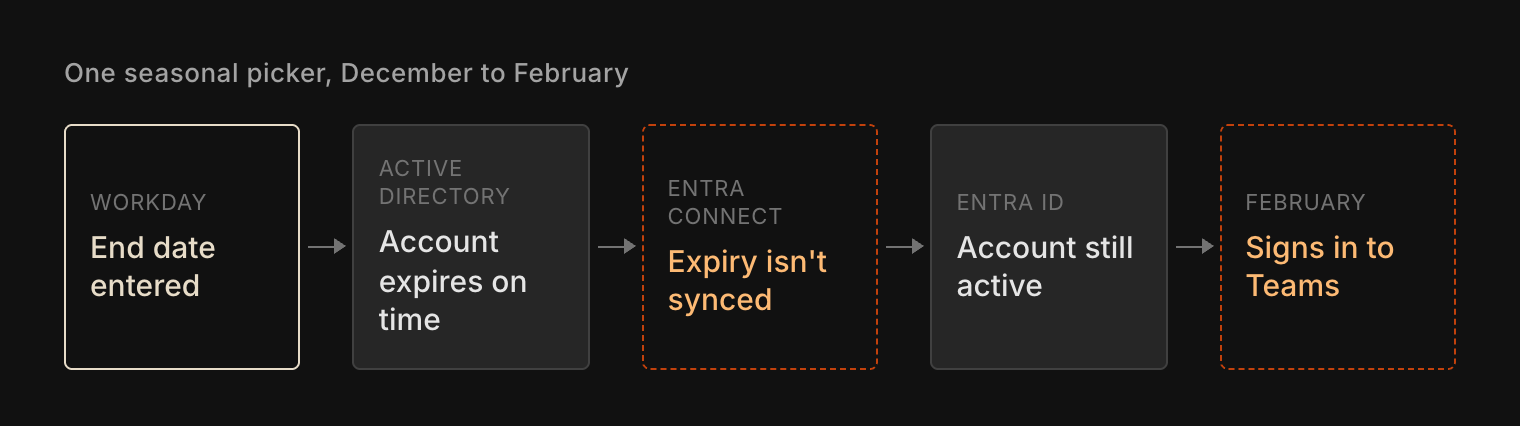
So the date reached exactly one system, the one that runs the shared Windows PCs in the warehouse. That's the one place a seasonal worker stops going on her last day. Everything she might still open from home signs in through Entra, and Entra had never heard of the date. At the distributor, 47 of last year's 212 seasonal accounts had signed in to Microsoft 365 after their AD account expired, almost all of them through Teams on a personal phone.
Every system in a stack has its own idea of what "ended" means, and the warehouse management system and the time clock each keep their own user table on top of the directory's. An end date written into one of them is a note in that system. It only becomes offboarding when something carries it to all the others.
The fix is to make the end date the trigger, rather than the termination that might turn up in March. In a hybrid Microsoft shop that's a nightly job that disables expired AD accounts, because disabled status does sync to Entra, plus a provisioning rule that reads the end date so the next small edit in Workday doesn't switch the account back on. A rehire with the same employee ID gets the old account back, so whatever disables it should strip its groups too.
Running offboarding off a date has a cost, and it's worth knowing before you copy this. Dates are wrong. A store manager keeps a good driver on for 2 extra weeks and doesn't tell HR, and the morning after the old end date the driver can't open the app with his route in it. While nothing acted on the date, that mistake was invisible. Now it's an outage with a name attached.
That's the better problem to have. It lands on someone who's still working and who will say so that morning, instead of on an account nobody is watching in February. It also moves the work to where it belongs: a conversation with HR about keeping end dates accurate, for every worker who has one.
A directory fix only reaches the directory. The warehouse management system, the time clock and every app outside Entra need the same date to arrive the same night, whether or not the app knows what Workday is. That's the part we build Iden for. The end date is the one fact about a seasonal worker everyone has on their first day, and it should be the only thing their offboarding needs.
We'd go through last season's seasonal and contract leavers with you and show which accounts are still live. No deck. Just the product.