The Legacy IGA Migration Guide: Real Costs, Realistic Timelines, and a Step-by-Step Checklist
Replacing SailPoint IIQ, Oracle, IBM, or One Identity feels terrifying. This guide breaks down the real migration costs, honest timelines, and a step-by-step checklist to de-risk the switch.
9 min read · Last updated July 2026
Most IGA migrations don't stall because the technology is too hard. They stall because the team can't get a clear answer to three questions: What will this actually cost? How long will it really take? And what breaks if we get it wrong?
This guide answers all three - honestly, with numbers. If you're running SailPoint IdentityIQ, Oracle Identity Manager, IBM Security Identity Manager, or One Identity and you're wondering whether the pain of staying is finally worse than the pain of switching, read on.
Why Teams Actually Migrate (It's Not Just the License Bill)
The decision to migrate rarely starts with a single trigger. It's usually a slow accumulation of friction that finally tips over.
Cost and upgrade fatigue. SailPoint IIQ implementations are notoriously difficult, often taking over a year to reach maturity, with professional service costs that can triple the initial software price. [1] That math gets worse every renewal cycle, and it doesn't include the internal engineering hours spent keeping brittle connectors alive.
Brittle connectors and the non-SCIM long tail. Legacy IGA was built for on-prem directories and a handful of enterprise systems. Over 90% of enterprise apps lack native SCIM support or don't offer security APIs for access management. [2] That means the average company running 96-116 SaaS apps - [3] - has most of its stack sitting outside legacy IGA's reach, governed by spreadsheets and help desk tickets.
Admin burden. More than a third of IT leaders say manual tasks are a key reason they're investing in IGA. [4] Legacy platforms require scripting in obscure languages just to model basic workflows - [5] - and every new SaaS app is a minor project.
Poor SaaS and non-SCIM coverage. 89% of organizations have integrated fewer than half of their applications with their IGA solution. [4] The apps that fall outside coverage are exactly the ones attackers exploit: orphaned accounts, over-provisioned contractors, zombie licenses.
Slow time-to-value. It is industry-common to budget 6-18 months to implement SailPoint IdentityIQ - even for just a few systems. [6] For a 400-person company facing its first SOC 2, that timeline is simply not an option.
What Migration Actually Costs
This is where most vendor conversations go vague. Here's a more honest breakdown.
The direct costs of switching
| Cost Component | Typical Range | What Drives It |
|---|---|---|
| New platform license (Year 1) | $30K–$150K+ | Per-identity pricing; scales with headcount and app count |
| License overlap (parallel run) | 1–6 months of dual spend | Longer for big-bang approaches; shorter with phased migration |
| Professional services (legacy platform) | 1–3× software cost | SailPoint IIQ migrations often require SI partners for gap analysis alone |
| Internal IT effort | 200–800+ hours | Inventory, connector testing, access review migration, UAT |
| Connector re-build / re-mapping | $10K–$80K | Highest for platforms with heavy custom BeanShell/Java connectors |
| Training and change management | $5K–$25K | Often underestimated; reviewer re-training is a real cost |
The hidden cost most teams miss: license overlap. If you're running a phased migration — which you should be — you'll pay for both platforms simultaneously for anywhere from 30 days to 6 months. Budget for it explicitly, or it becomes a nasty surprise at renewal.
The cost of doing nothing
This is the number that rarely makes it into the migration business case, but it should.
Nearly 60% of organizations identify high TCO as a principal deficiency in their current IGA solution, according to Omada's 2025 State of IGA report. [4] Between licensing, customization, and ongoing maintenance, legacy platforms drain budgets without proportional value.
Beyond the license bill: IBM's 2024 Cost of a Data Breach report puts the average cost of a data breach at $4.88 million, with breaches involving compromised credentials taking an average of 292 days to resolve. [7] Varonis found that 26% of user accounts are stale - inactive for 90+ days but still enabled. [4] Those are the accounts that legacy IGA, with its limited SaaS coverage, is most likely to miss.
A Ponemon report found that 53% of organizations have suffered a breach due to the inability to secure access to disconnected apps. [2] If your legacy IGA only governs 40-50% of your app stack, you're not just paying for incomplete coverage - you're carrying the risk of the uncovered half.
Realistic Migration Timelines
Here's where vendor marketing and reality diverge most sharply.
Legacy re-platforming (IIQ -> ISC, OIM -> SailPoint/Saviynt)
When one SailPoint partner assessed a major oil and gas company's IIQ-to-ISC migration, they identified 32 major gaps - 78% of which had a complex migration path requiring multiple teams, business process changes, and operational change. [8] That's not a horror story - that's a typical mature IGA environment.
Migrations from Oracle Identity Manager to modern IGA platforms have taken as long as 6 months just to cut over access request workflows and shut down the legacy development environment. [9] And that's with an experienced SI partner driving it.
The honest timeline for a legacy re-platform:
- Discovery and gap analysis: 4-8 weeks
- Core connector rebuild and testing: 8-16 weeks
- Parallel run and UAT: 4-8 weeks
- Access review migration and cutover: 4-6 weeks
- Decommission legacy platform: 2-4 weeks
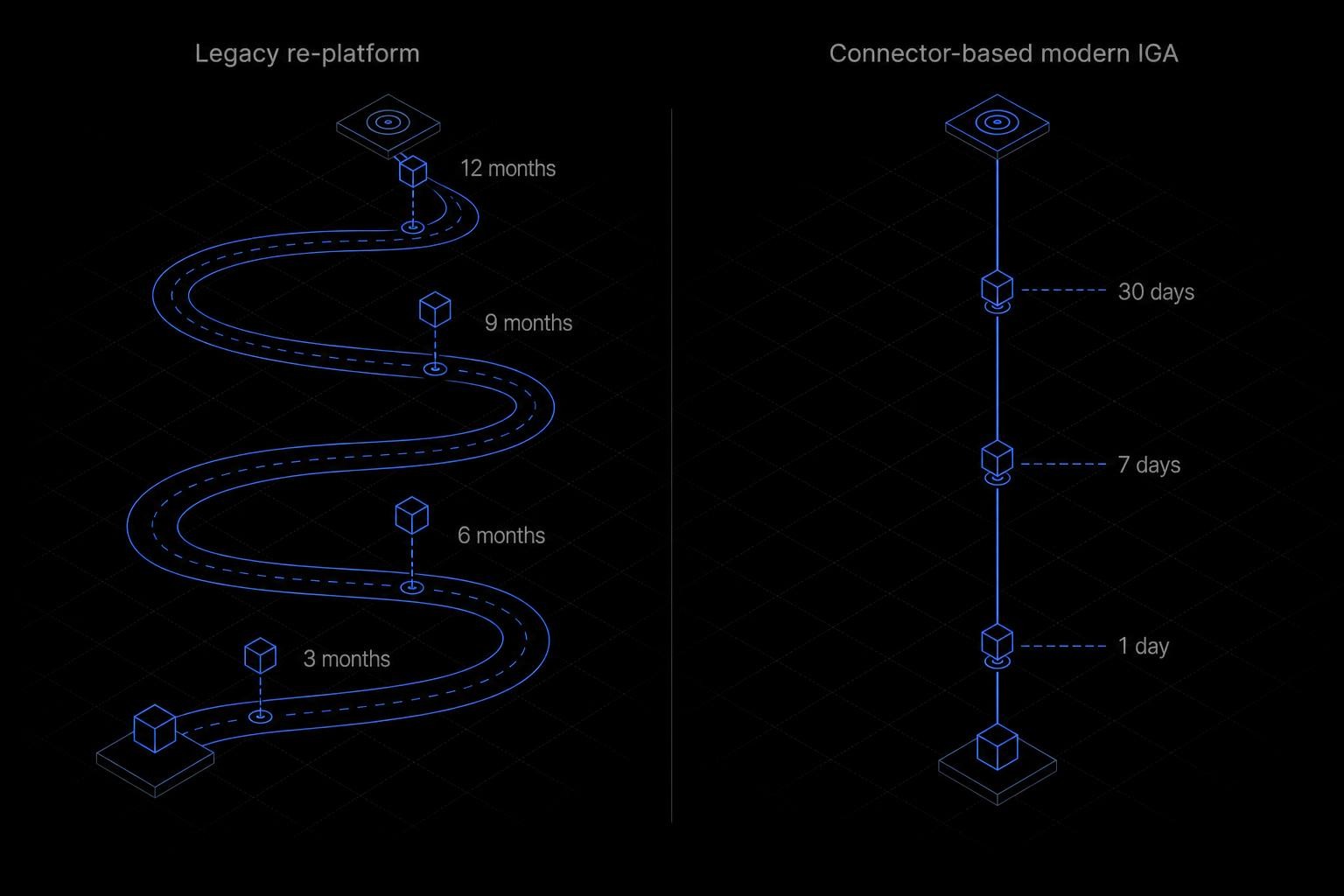
Total: 6-18 months. The lower end assumes a small app footprint, a dedicated internal team, and no significant customizations. Most mid-market companies land in the 9-12 month range.
Connector-based modern platforms
The calculus changes entirely when the new platform uses pre-built connectors rather than requiring custom development for every app. Platforms with 100+ pre-built connectors - covering SCIM, API, and non-SCIM apps - can reach core coverage in days to weeks, not months.
Iden users report up to 80% fewer manual access tickets within weeks of deployment, saving 120+ hours per quarter on access reviews. [6] The difference is architectural: instead of rebuilding connectors from scratch, you're configuring pre-built ones.
The Step-by-Step Migration Checklist
This is the sequence that works. Deviating from it - especially skipping the inventory phase or attempting a big-bang cutover - is where most migrations go wrong.
Before touching the new platform, map every application your current IGA governs — and every one it doesn't. Include SCIM-connected apps, API-connected apps, and the long tail of non-SCIM SaaS tools managed manually. Document current entitlement structures, role definitions, and access review cadences. This step typically takes 2–4 weeks and is the single biggest predictor of migration success.
Rank applications by access risk: privileged systems, data stores with PII, financial systems, and any app in scope for SOC 2, ISO 27001, or PCI DSS. Migrate high-risk apps first — not the easy SCIM-connected ones. The goal is to close your biggest security gaps early, not to hit a connector count milestone.
Evaluate platforms against your full app inventory — not just the SCIM-friendly top 20. If 75–85% of your apps require manual provisioning today, a SCIM-only modern IGA will reproduce that problem. Verify connector depth: does the platform govern at the channel, repository, and project level, or just create/delete accounts? Configure and test connectors for your top-priority apps before going live.
Run both platforms simultaneously for at least 30 days on your pilot app set. Compare provisioning outputs, access review results, and deprovisioning accuracy. Parallel running costs money (dual licensing), but it's far cheaper than a failed cutover that leaves access gaps or locks out users. Expand the parallel run to your full app inventory in waves.
Access review migration is the most underestimated step. Your reviewers have muscle memory for the old platform's UI and workflow. Before decommissioning legacy IGA, run at least one complete access review cycle on the new platform — ideally for a high-risk application — so reviewers are trained and the process is validated. Migrate historical review data or archive it in a data warehouse for audit continuity.
Only decommission after: (a) all apps are connected to the new platform, (b) at least one full access review cycle has completed, (c) offboarding automation has been tested end-to-end, and (d) your audit trail is intact. Decommission in stages — disable the legacy platform's provisioning first, then its review workflows, then shut down infrastructure. Keep read-only access to historical data for 12–24 months.
Common Pitfalls (and How to Avoid Them)
Lift-and-shift of bad roles
The most expensive mistake in IGA migration is importing your legacy role model wholesale into the new platform. Legacy IGA environments accumulate years of role bloat: roles created for one-off projects, roles that were never cleaned up after reorgs, roles that grant far more access than their names suggest.
More than 70% of IT and business leaders report that people in their organizations have unnecessary or excessive access to data and applications. [4] If you migrate that access model as-is, you've just moved the problem to a new platform with a new license bill.
Fix: Treat migration as a role rationalization opportunity. Before importing any role, validate that it reflects current least-privilege requirements. It's more work upfront, but it's the only way to avoid re-doing the exercise 18 months later.
Underestimating the non-SCIM long tail
Most migration plans focus on the 15-25 apps that support SCIM. SCIM coverage typically reaches only 15-25% of apps, leaving manual provisioning still required for 75-85% of the stack. [10] If your new platform can't govern the non-SCIM long tail, you haven't solved the problem - you've just moved the manual work to a different ticketing queue.
Before committing to a platform, test it against your five most awkward non-SCIM apps: the internal wiki, the project management tool on a starter plan, the design tool that requires enterprise upgrade for API access. If the platform can't automate those without forcing you into expensive enterprise plan upgrades, the coverage gap will persist.
Big-bang cutovers
A big-bang cutover - turning off legacy IGA and turning on the new platform simultaneously - is the highest-risk migration pattern. It eliminates the safety net of parallel running, compresses testing time, and means any connector failure or access review gap becomes an immediate production incident.
Without upfront analysis, migrations often suffer scope creep, integration surprises, and manual rework that delay delivery. [11] Phased migration with parallel running is slower and costs more in the short term, but it's the approach that actually works.
How Iden Approaches Migration Differently
The reason legacy IGA migrations take 6-18 months is largely connector complexity. Every new app requires custom development, and every custom connector becomes a maintenance liability.
Iden's connector-based architecture - covering SCIM, API, and non-SCIM apps - means core coverage goes live in days to weeks, not months. With 175+ pre-built connectors (and growing), including apps that don't support SCIM or APIs at all, you're not rebuilding your integration layer from scratch. You're configuring it.
That changes the migration math: instead of a 12-month re-platform project, you can run Iden in parallel with your legacy platform, validate coverage across your full app stack, and decommission legacy IGA once you're confident - without the big-bang risk.
It also avoids the SCIM tax problem. [10], meaning you'd pay 2-4× the base plan price just to enable provisioning for each app. Iden connects to apps without requiring enterprise-plan upgrades - no SCIM tax, no coverage gaps.
For a deeper comparison of what legacy and modern IGA platforms actually deliver, see our [6].
Migration Readiness: Where Do You Stand?
Use this quick self-assessment to gauge your migration readiness before you start vendor conversations.
The Migration Checklist (Printable Summary)
Here's the condensed version you can share with your team or attach to a project brief:
Phase 1 - Inventory (Weeks 1-4)
- Map all apps currently governed by legacy IGA
- Map all apps not governed (the manual/spreadsheet long tail)
- Document current role model, entitlement structures, and review cadences
- Identify top 10 highest-risk apps by access sensitivity
Phase 2 - Platform Selection (Weeks 3-6)
- Evaluate new platforms against your full app inventory, not just SCIM apps
- Test connector depth on your 5 most awkward non-SCIM apps
- Confirm no enterprise-plan upgrade required for key apps
- Validate access review workflow and reviewer UX
Phase 3 - Parallel Run (Weeks 6-18)
- Configure and test connectors for high-risk apps first
- Run both platforms simultaneously for ≥30 days
- Compare provisioning outputs and deprovisioning accuracy
- Expand to full app inventory in waves
Phase 4 - Access Review Migration (Weeks 12-20)
- Run at least one complete access review cycle on new platform
- Train reviewers on new UI and workflow
- Archive historical review data for audit continuity
Phase 5 - Decommission (Weeks 18-24)
- Disable legacy provisioning workflows
- Disable legacy review workflows
- Shut down legacy infrastructure
- Retain read-only historical data access for 12-24 months
The migration is not as terrifying as it looks - but it does require honest planning. The teams that struggle are the ones who underestimate the non-SCIM long tail, lift-and-shift bad roles, or attempt a big-bang cutover to hit an arbitrary deadline. The teams that succeed treat migration as a governance improvement project, not just a platform swap.
If you want to see what your specific app stack looks like against Iden's connector coverage - and get a realistic timeline for your environment - that's exactly what our migration conversations are designed to answer.
- infisign.ai — Sailpoint
- cerby.com — Provisioning and deprovisioning apps without scim
- bettercloud.com — Saas statistics
- c1.ai — Identity governance
- veza.com — Iga solution stuck in the past modern access governance
- articles.idenhq.com — Modern iga vs legacy iga which identity
- cloudeagle.ai — What is identity governance and administration iga
- xalient.com — Sailpoint identityiq to identity security cloud migration case study
- airitos.com — Legacy iam migration accelerator
- zluri.com — Scim provisioning
- proofid.com — Sailpoint migration assessment
Related reading
Secrets Management vs. NHI Governance: Where Vaults Stop and Identity Begins
A vault secures the secret - it doesn't govern the identity holding it. Here's the gap between secrets management and NHI governance, and why you need both layers in 2026.
Honest Guide to Okta Alternatives for Identity Governance
Okta is best-in-class SSO. But when governance depth, non-SCIM coverage, or cost at scale become the problem, here's an honest look at what to consider instead.
The Honest IAM Buyer's Guide: Best Tools by Category in 2026
A trade-off-first guide to IAM tools in 2026 - SSO, IGA, PAM, CIAM, and directories explained, with honest best-fit profiles for Okta, Entra ID, SailPoint, CyberArk, Lumos, Iden, and more.