Day-one access looks like a provisioning problem. Mostly it is a policy problem. Most teams could automate the provisioning tomorrow and still could not say what a new joiner in a given role is supposed to have.
The HR email arrives Friday at 4:47pm. "Starts Monday." Sometimes attached to a calendar invite, sometimes just buried in the inbox between two other people's PTO notices. The new hire needs 12 apps by 9am. Most aren't SCIM-connected. Half don't have an admin who's checked their own admin panel in 3 months. Two require a manager approval from a person flying back from a conference Sunday night.
Monday morning the new hire opens their laptop. SSO logs them into the 8 apps they have. They send a Slack message about the rest. IT picks it up around 11. Some of it lands the same day. Some lands Wednesday. The dashboarding tool finance needs them to see takes until Friday.
This is what most onboarding looks like, and effort is not the variable. Two things are missing: a written answer to what the role should have, and a way to reach the apps that aren't on SCIM.
Birthright access is the alternative. This is what it takes.
Why most onboarding leaks
Five things have to be true.
- One trigger. The HRIS marks someone as starting. Not a Slack message. Not a welcome email. Not a ticket queue.
- A role-to-app policy. For each role in the organization, the system knows which apps and which entitlements get provisioned. The policy is the source of truth, not someone's memory.
- The provisioning fires automatically across every connected app, including the apps SSO can't reach via SCIM. SCIM apps get SCIM. Non-SCIM apps get API or browser-driven provisioning. Same trigger, same outcome.
- The whole sequence completes in minutes, not days. Day-one access means day-one. Not Tuesday.
- An audit trail captures every grant: who got what, when, under which policy, with what approval. The compliance evidence assembles itself.
If your current onboarding is missing any of those, what you have is manual onboarding with some automation bolted on. Common configuration. Familiar pattern. Not birthright.
Two structural reasons.
The coverage problem. Most identity tools handle SCIM-supported apps natively. The rest get "ticket-based provisioning," which is a fancy name for IT doing it by hand. For the average mid-market stack that's 80% of the apps in the manual queue on day one, and our SCIM Tax Index has the per-vendor detail: 300+ SaaS products and the plan tier each one gates SCIM behind. The new hire is unblocked on the SCIM apps. Blocked on the rest.
The policy gap. The role-to-app mapping lives in someone's head, in a welcome-email template, in a Notion doc that hasn't been updated since the last reorg. Each new hire requires a human to translate "she's joining the data team" into "she needs Snowflake, Looker, the data warehouse admin role, the dbt project, the staging database read-only, the ETL Airflow access." If the role policy isn't structured, the same translation happens manually every time.
These compound. Even if you nailed role-policy mapping, the coverage gap leaves you provisioning the long tail by hand. Even if you covered the long tail, ad-hoc role translation creates inconsistency. Both have to be solved together for birthright to fire.
What it takes to make birthright fire
Four conditions. All four.
1. One source of truth. The HRIS knows when someone is starting, in what role, in what status. That's the trigger. If onboarding is kicked off from anywhere else, a welcome email or a Slack request or a calendar invite, the policy machinery isn't running.
2. Role-based policy, written down. For each role the policy lives in the system: app list, entitlement bundles, group memberships, conditional rules for contractor variants and location-specific apps. Most teams get 80% of this during setup and refine over the first quarter.
The teams that take longer aren't behind. They're re-litigating which apps each role should have, which is a worthwhile argument that mostly shouldn't block the work.
3. Coverage across the actual stack, including the non-SCIM apps. Birthright is only birthright if it fires across the eighth app and the eightieth. SCIM where the app has it, an API where it doesn't, console automation for the admin-panel-only ones, a custom connector where none of that applies.
4. Automation triggered, not queued. The provisioning runs in seconds, not as a ticket someone opens at 11am. The same machinery that handles offboarding handles this, in reverse.
Patterns that break birthright
A few common failure modes worth naming.
- Role explosion. Every variation becomes its own policy. By month 6 you have 47 roles where you started with 12, and most of the 47 differ on one or 2 apps. A small role set plus exception rules is easier to maintain than a sprawling taxonomy.
- The exception that becomes the default. Someone needed an unusual combination for a project. It went in as a one-off. Three months later half the team is on it. The policy and the practice have drifted, so tighten the policy.
- The "Slack IT for access" workaround. A new hire hits an app birthright didn't cover and messages IT. Once a week is an exception. Every new hire means the policy is wrong, not the new hire.
- The role that isn't in the HRIS. The new hire is "Software Engineer III, ML Platform" and the policy is keyed on "Software Engineer." Reconcile one to the other. The system can't infer.
- First-week elevated access. Extra permissions "for the first week to learn the systems," which never come off. Same pattern as number 2 with a calendar attached. Time-bound it at the moment you grant it, so birthright includes the elevated access and its expiry.
Doing this without a tool
Most of birthright is policy work, and policy work is free. The expensive part is execution.
- Write the role-to-app map in a spreadsheet. One row per role, one column per app, the entitlement in the cell. This is the artefact that matters and you can build it without buying anything.
- Reconcile it against the HRIS job titles, exactly as they're spelled there. Mismatches here are the single most common reason day-one access silently fails.
- Put new-starter reports on a daily job, at least 3 days ahead so approvals have room.
- Group the apps by how you provision them: SCIM, API script, manual console. The manual column is your real workload, and its size is the argument.
- Give the elevated first-week access an expiry date in the same row you grant it.
- Review the map after every reorg, not quarterly. Reorgs invalidate it faster than time does.
Thirty to 90 minutes per hire, nearly all of it in the manual column.
The map is the part to build this week whatever you decide about tooling. It's the only artefact here that survives the decision, and every conversation about onboarding gets shorter once it exists.
What still needs a person
Birthright covers the set everyone in a role gets. It does not cover the exceptions, and the exceptions are where onboarding goes wrong.
A contractor with no HR record has no trigger to fire from. A role that changed the week before the start date needs somebody to notice. And a few apps insist the first account be created by a named administrator, which no policy engine can do on your behalf. Those route to the app owner with the context attached, and they are why an honest first-Monday summary is rarely all green.
Where Iden fits
The map from step 1 stops being a spreadsheet and becomes the thing that fires.
The HRIS start date is the trigger. The role policy resolves to a set of apps and entitlements. Each app gets provisioned by whatever method it actually supports, and the run is visible as it happens, per account, with its own ticket reference.
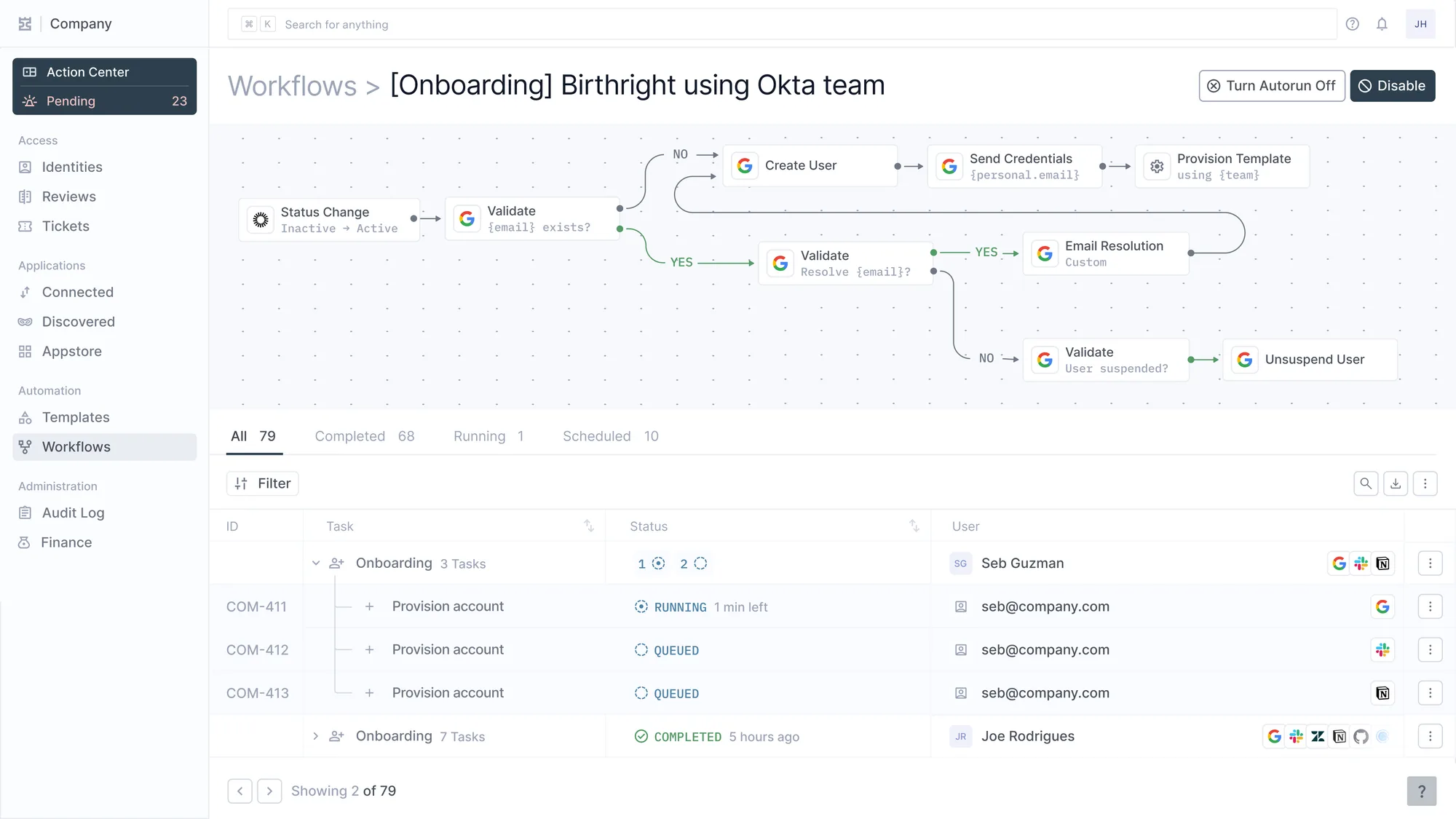
Derselbe Workflow als Definition und als Durchlauf. Darunter drei Accounts für eine Einstellung, jeder mit eigener Ticket-ID.
If onboarding today is a ticket queue and a welcome-email template, that's the shift. If it's already partly automated through Okta Lifecycle Management or a SaaS management tool, this is the layer that closes the long tail and gives the role policy somewhere to live.
The new hire's first morning becomes uneventful. Which is the entire point.