An identity with no owner has no lifecycle. Nobody will review it, nobody will rotate it, and nobody will remove it when the thing it was built for gets retired. That's the whole reason this inventory matters, and it's why the ownership column is more urgent than the credential list.
Most teams can't produce the list at all. Not a partial one, not a stale one. Asked for every service account, API key and CI credential in the environment, the honest answer is a shrug and three places to start looking.
Why the identity provider doesn't have it
Because most non-human identities were never created there.
A service account in Salesforce gets made in Salesforce. An API key in Stripe gets minted in Stripe. A CI credential lives in GitHub Actions. A webhook secret sits in whatever created the webhook. None of them pass through your IdP, so none of them appear in the list your IdP produces.
What your directory holds is the subset somebody deliberately modelled as a directory object, usually because they needed SSO for it. That's the minority, and it's also the best-governed minority, which makes the list actively misleading: it looks reassuring precisely because it contains the ones you handled properly.
The six places to look
Work through these in order. The order is by yield, and the last two are the ones most sweeps skip.
- 1. Your identity provider. Service accounts and integration users modelled as directory objects. Start here because it's easy and because it establishes the naming conventions you'll match against later.
- 2. Per-app admin consoles, for your top 20 apps by sensitivity. Look for accounts that aren't people: a name with
svc,bot,api,integrationor a shared mailbox, or a licence assigned to something with no manager. Salesforce, NetSuite, your ticketing system and your data warehouse are usually the richest. - 3. Cloud IAM. Roles, service accounts, access keys and instance profiles in AWS, GCP or Azure. Sort by last-used, which most cloud providers expose, and anything unused for 90 days goes on the list with a question mark.
- 4. CI and automation. Deploy keys, runner credentials, personal access tokens used by pipelines, secrets in your CI store. This is where credentials minted by people who have left tend to survive longest, because pipelines keep working and nobody audits a thing that works.
- 5. OAuth grants and installed apps. Every third-party app authorised against your Google Workspace or Microsoft 365 tenant, with the scopes it holds. This catches integrations nobody registered anywhere else.
- 6. Agents and MCP servers. Anything an engineer stood up in the last 18 months to let a model act on your systems. These are the newest and the least likely to appear in any of the five lists above.
For each one, record 5 fields and no more: what it is, what it can reach, who owns it, when it was created, when it was last used.
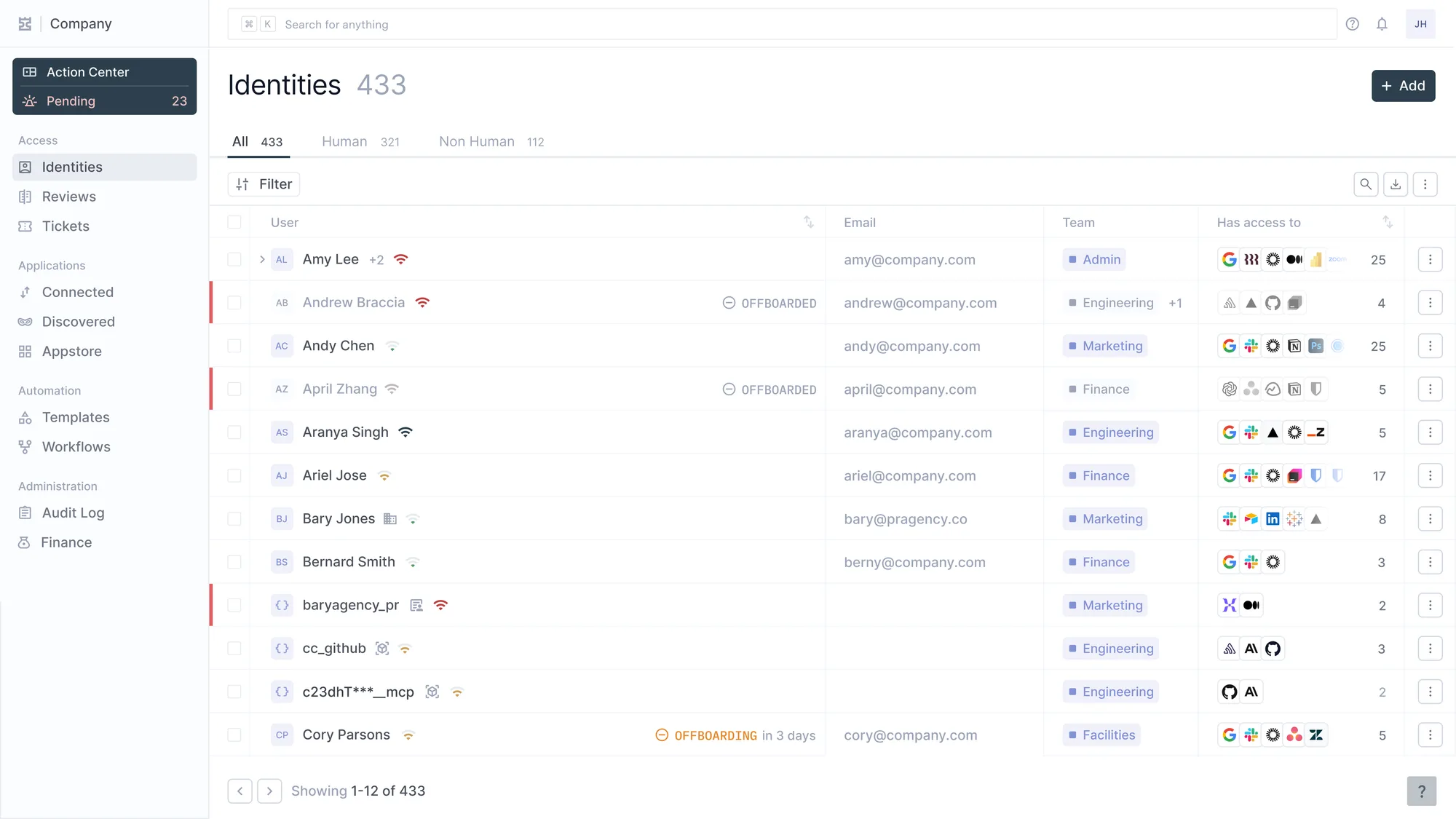
433 Identitäten, 321 davon human, 112 nicht. cc_github und das MCP-Token stehen in derselben Tabelle wie Amy Lee, mit denselben Spalten und denselben Offboarding-Zuständen.
Two of those five fields do most of the work. Owner, because an unowned credential can't be decided about. Last used, because it separates the credential you have to think carefully about from the one you can retire this week.
Patterns that break it
- Naming conventions as the search method. Half of what you're looking for is called
dave-testorintegration2, and the ones named properly were made by people who were already being careful. - Owner recorded as a team. "Platform team" is not an owner. Teams reorganise and nobody inherits, which is how a credential becomes ownerless without anybody losing it.
- Deleting before understanding. Rotate a key nobody understands and you'll take down something. One of those incidents ends the programme.
- A one-off sweep. Discovery is how you catch up. Creation has to be the control point or the inventory is stale within a quarter.
- Leaving them out of the access review. A review that covers people only leaves the fastest-growing identity population unreviewed, and CC6.1 already gestures at this in its points of focus.
Doing this without a tool
Mostly a spreadsheet and a fortnight of attention. Worth doing before you buy anything, because the count is the business case.
- Make the sheet first, with the 5 fields above as columns. Doing this before you start looking stops the exercise becoming a pile of exports.
- Work the six sources in order. Timebox each to an afternoon. Depth per source matters less than covering all six.
- Fill the owner column by asking, not by inferring from who created it. The creator has often left, which is the finding.
- Flag every row with no owner in red. That subset is the actual output of the exercise, and it's usually between 10% and 30% of the list.
- Rotate nothing yet. Assign owners, then let each owner decide about their own rows.
- Add creation-time registration for the sources you control, starting with cloud IAM and CI. This is the step that stops you doing all of the above again next year.
Expect two to three days of work across the six sources, and expect the count to be higher than headcount. Step 6 is the only part that changes the trajectory, and it's the part that looks optional next to a list of live findings.
What still needs a person
Ownership. Every row resolves to somebody agreeing to be accountable, and no system assigns that on your behalf. This is the whole exercise, and it's a series of conversations rather than a scan.
The rotation decision. Rotating a 2-year-old key now or at the next release window is a judgment about blast radius. The person who owns the system is the only one positioned to make it.
And the shared credential. Something used by 4 people through one login is a different problem with a different fix, and the fix usually costs money rather than saving it.
Where Iden fits
Steps 1 and 4 above, standing rather than assembled.
Humans and non-humans sit in one identity list, with the same columns and the same lifecycle states. A service account and an employee are both rows, not two governance problems. The owner field is required rather than optional, which is what makes the red subset shrink instead of persisting.
The part that matters beyond the inventory is what happens next. Because they're in the same list, they're in the same access review and the same offboarding path. The credential a departing engineer created surfaces when they leave, not 2 years later. Whether that credential should act on its own behalf rather than inheriting is the harder question. The AI agent governance pillar takes it on.