An orphaned account is an account that still exists and often still works, but has no valid owner behind it. The employee left, the contractor rolled off, or the role changed, and the account itself did not go anywhere. Orphaned accounts are not an edge case but the normal by-product of deprovisioning that misses systems, and every stack that offboards from a checklist accumulates them.
every account in every app           the roster of current people
-----------------------------------  -----------------------------------
amy.lee@        Salesforce   <---->  Amy Lee         active
j.park@         Salesforce   <---->  J. Park         active
d.osei@         Salesforce   -- ?    (left in May)    -->  ORPHANED
svc_reporting   Salesforce   -- ?    (not a person)   -->  ORPHANED, unless owned
guest_2023      Salesforce   -- ?    (never a hire)   -->  ORPHANED

match = fine.   no match = a candidate for removal, and an audit finding waiting.
How do orphaned accounts accumulate?
There is rarely a single dramatic failure behind them. The pattern is a slow drip, and each drop has a recognisable shape.
The missed application
Someone leaves, SSO is disabled, and one application that kept a local login is missed. The application never took its user list from the directory, so nothing told it the person had gone. This is the most common source, and it concentrates in the applications outside SCIM.
The contractor with no end date
A contractor finishes a project, but their access was granted ad hoc and never tied to a date. There is no HR termination event for a contractor, so the leaver workflow never fires. The account persists until an access review or an auditor finds it.
The service account that outlived its creator
An engineer creates a service account for a migration, leaves the company two years later, and the account keeps running under credentials nobody rotates. Reconciling against the roster never flags it, because it was never a person.
The mover who kept the old role
Someone changes teams and gains new access, and the access from the old role is never removed. The account has a valid owner, but the entitlement does not, and it is orphaned in the sense that matters to an auditor: nobody current can say why it exists.
For example, when I left [then startup, now publicly traded] in Nov 2013, it took them 15+ months until they turned off my Github access.. in the meantime, I had access to all the private repositories. (Yes, I notified them multiple times.)
Each of these is one account. Across a few hundred people, a few dozen applications and a few years they add up to a population nobody holds a complete list of.
Why do orphaned accounts cluster in apps without SCIM?
Where an application takes its user list from the directory over SCIM, disabling the person closes the account and orphans are rare. Where it does not, the application keeps its own user list and nothing tells it that the person has gone.
| Where the account lives | What happens at offboarding | Orphan rate |
|---|---|---|
| Application provisioned over SCIM | The directory deactivates the account | Low; misses are usually configuration errors |
| Application with SSO but no SCIM | SSO login stops; the account and any local password remain | High; the account looks fine from the identity provider |
| Application with no SSO | Nothing happens unless a person acts | Highest; the application is often not on the checklist |
| Internal tool with its own user table | Nothing happens unless the builder remembers | Highest; often nobody current knows the table exists |
What the identity provider can and cannot see
Standard-plan SaaS, internal admin panels and legacy systems fall into the last three rows, and in most mid-market stacks those rows are the larger part of the stack. The identity provider has a complete picture of exactly one thing, which is the set of assignments it made itself. Everything created another way is invisible to it: a login that predates the rollout, an invitation sent by a colleague inside the product, a local password set up as a break-glass path, and a guest account in another company's tenant. Reconciling those applications means pulling each one's actual account list rather than trusting the identity provider's view of it.
Why the count is always wrong
The directory can still be useful for detection, as long as its limits are understood. Microsoft's guidance on managing inactive user accounts works from the last sign-in timestamp on each account, which is the right signal and only covers accounts the directory knows about. An orphan in a local user table has a last sign-in date too, and no report in the identity provider will ever show it.
Why do orphaned accounts matter?
They matter for two reasons, security and compliance, and the second is usually what gets them fixed.
Security
An orphaned account is access with no accountability attached. No active employee is tied to it, so nothing about its behavior looks out of place, and it sits there as an available entry point. Dormant, unwatched accounts are a standard target for credential stuffing and lateral movement. The account that logs in once a year is the one nobody notices being used by someone else. When the account belonged to an administrator, the orphan carries the administrator's privileges with it.
Compliance
An orphaned account is a direct finding. SOC 2 CC6 and the ISO 27001 access controls expect access to map to current, authorized people. An auditor who samples accounts and lands on a former employee with a live login has found exactly what the control exists to catch. One such account in a sample of 25 is a finding. Three is a pattern, and the auditor widens the sample.
Practitioners who have been on the leaving side know how long the tail is. An engineer with thirty years of privileged access described handing the list back on the way out:
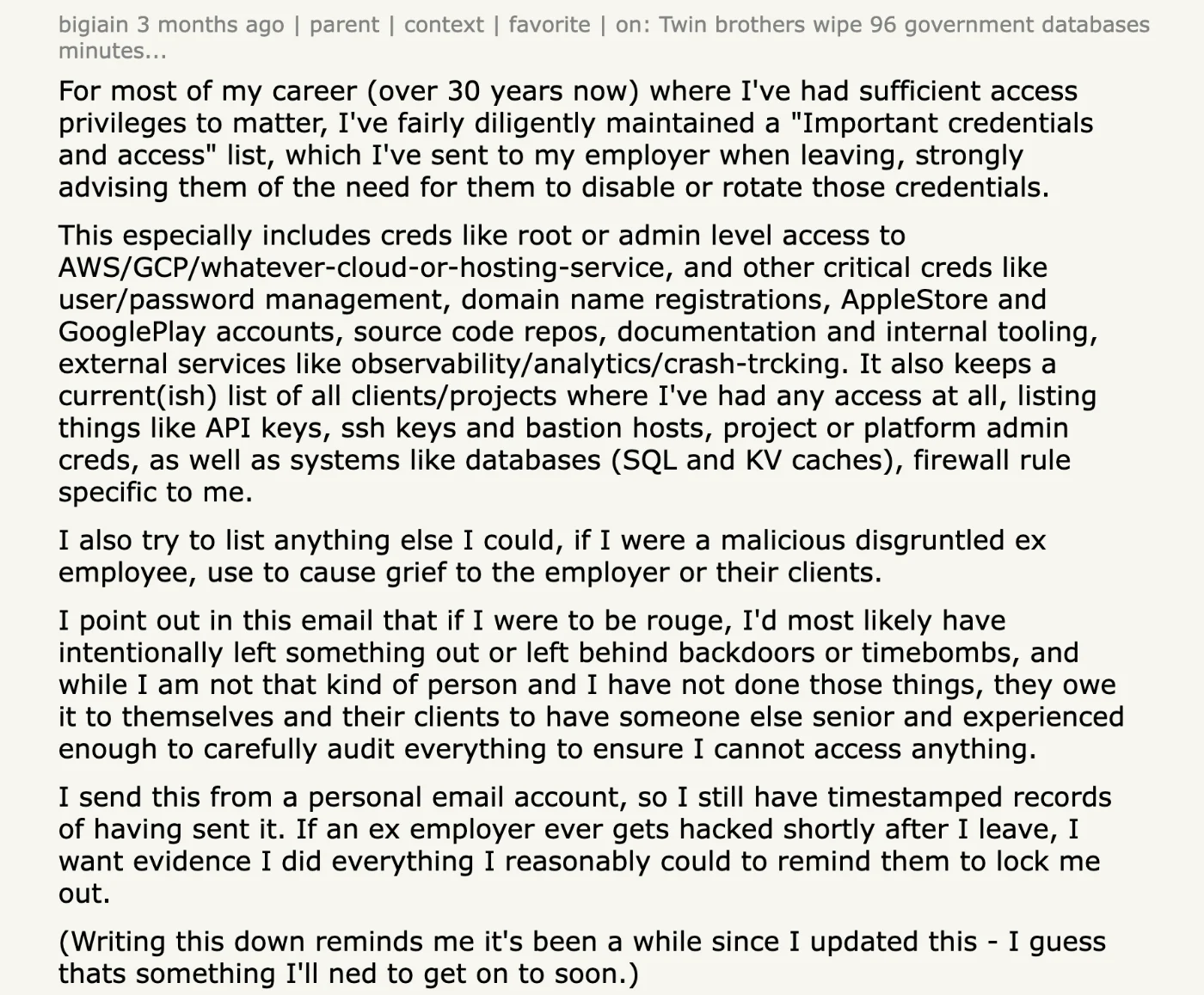
For most of my career (over 30 years now) where I've had sufficient access privileges to matter, I've fairly diligently maintained a "Important credentials and access" list, which I've sent to my employer when leaving, strongly advising them of the need for them to disable or rotate those credentials.
A process that depends on the leaver being that diligent is not a process.
How do you find and clear orphaned accounts?
The method is reconciliation, and it has four steps.
- Pull every account from every application, including the applications the identity provider cannot see, by API or by export.
- Match each account against the current list of active identities: the HR roster for employees, the contractor register for contractors, and the owner field for non-human identities.
- Treat anything that does not match as a candidate: former employees, unused local accounts, external guests who were added once, and service accounts with no named owner.
- Decide per candidate. Reassign it to a valid owner, archive it, or remove it, and record the decision.
What counts as a match
Step two sounds mechanical and is where most first attempts go wrong. Matching on email address fails in four predictable ways. Contractors are often invited on their own agency addresses. Long-serving staff have accounts under a previous surname or a legacy domain. Shared logins carry a team alias that matches nobody on the roster. And several applications let a person change the address on their own profile after the account was created. A reconciliation worth running matches on a stable identifier where the application exposes one, keeps the address as a secondary signal, and routes anything ambiguous to a human rather than silently counting it as matched.
Why coverage is the hard part
The hard part is coverage rather than method. Reconciling the SCIM-connected applications is straightforward because those accounts are visible to the identity provider. The orphaned accounts that matter most live in the applications the identity provider cannot see, which means connecting to each of those directly and pulling its real account list. The first run of that exercise is also the only one that produces a large number, because after it the population is a function of how well the lifecycle works rather than of how long the company has existed.
Iden's Action Center lists orphaned accounts as a finding category. Each row shows how long ago the person was offboarded and how many applications still hold an account for them, and resolving the row closes those accounts. The reconciliation runs against every connected application, including the ones the identity provider has never seen. The feature behind it is Offboarding you can prove, not just tick.
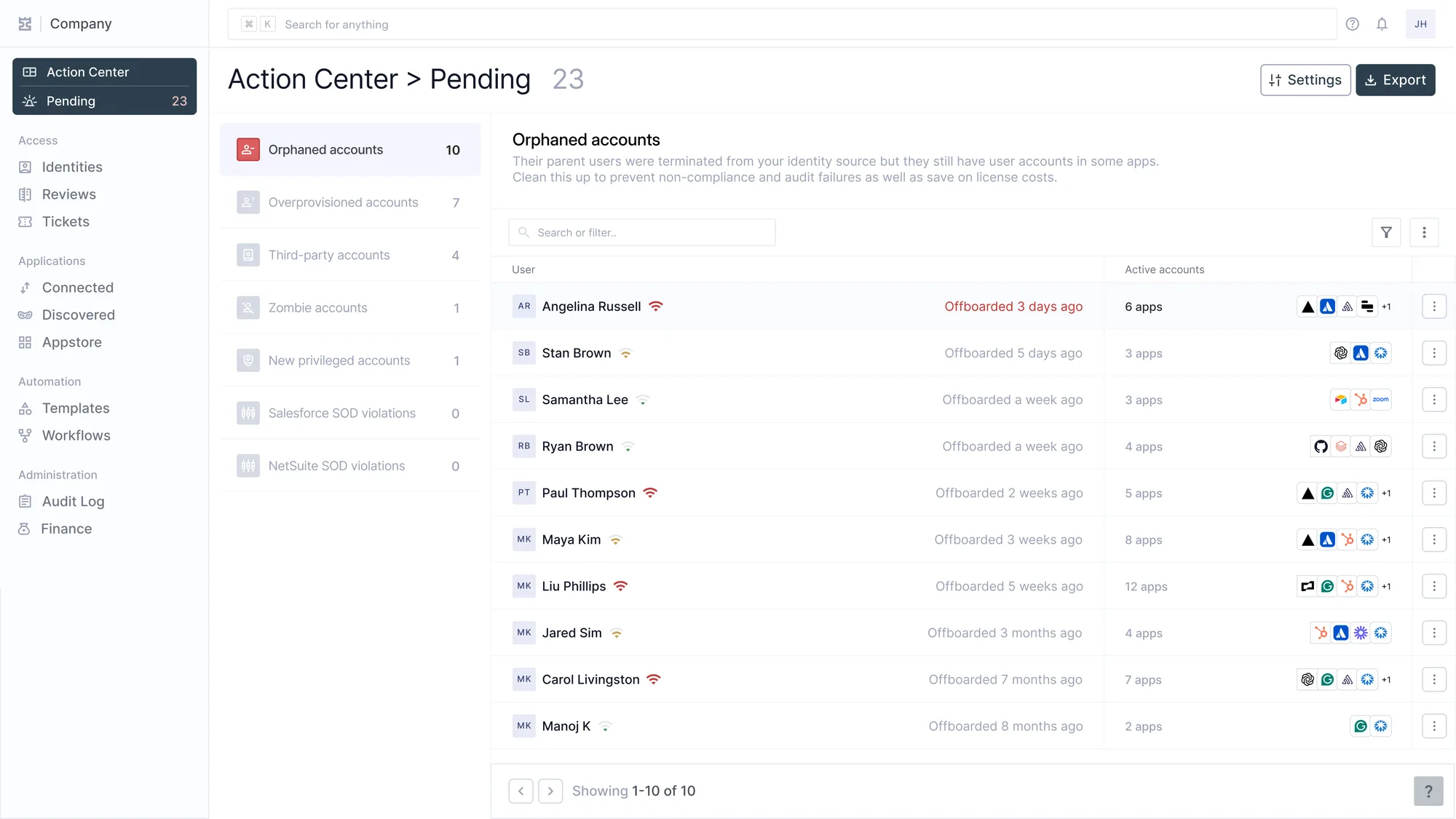
Findings as an inbox. Categories and counts on the left, the queue on the right, and two categories already at zero. Angelina was offboarded three days ago and still holds six apps.
How are orphaned accounts prevented?
Cleanup is a one-time correction, while prevention is the lifecycle working as designed. Prevention comes down to four habits, and none of them is a report.
- Every account in every application is created through a path that records who it belongs to, so that ownership is known from the first day rather than reconstructed later.
- Every departure fires deprovisioning across every connected application, not only the ones behind SSO.
- Every contractor and every non-human identity carries an owner and an expiry date, so that the identities outside the HR system have a leaver trigger of their own.
- A recurring access review catches the accounts that slip through between offboarding events, and its rejections execute the removal.
Why the review is the backstop
The recurring version of the reconciliation exercise is the access review, and the two habits above it are what determine how much work the review has to do. A lifecycle that creates accounts with recorded ownership and closes them on a trigger leaves the review very little to find. A lifecycle that does neither turns the review into the cleanup crew, which is both the most expensive way to find an orphan and the slowest, because the account has already been open for a quarter by the time anyone looks. When the lifecycle is working, the review finds nothing, which is the point.