A zombie account is an account that is still switched on but that nobody actually uses. It belongs to someone who left, to a project that ended, or to a tool the team tried once and abandoned. It sits there enabled, quietly costing money and quietly widening the attack surface. The name is doing real work. The account is not alive in any useful sense and not dead either. It can still log in, and it can still be used.
                     used recently            not used in 90+ days
                  +-----------------------+----------------------------+
has a valid owner |  healthy account      |  ZOMBIE                    |
                  |                       |  (paid seat, unwatched)    |
                  +-----------------------+----------------------------+
no valid owner    |  ORPHANED, and        |  ORPHANED and ZOMBIE       |
                  |  still running        |  (the usual leaver case)   |
                  +-----------------------+----------------------------+
found by: reconciliation last-login dataZombie account or orphaned account: what is the difference?
The two terms get used interchangeably, and most real accounts are both, but they describe different properties. A zombie account is defined by use: nobody is logging in. An orphaned account is defined by ownership: nobody valid stands behind it.
| Account | Dormant? | Ownerless? | Classification |
|---|---|---|---|
| A departed employee's forgotten login | Yes | Yes | Zombie and orphan |
| A service account that runs a nightly job, whose creator has left | No | Yes | Orphan only |
| A current employee's seat in a tool they stopped using | Yes | No | Zombie only |
| A current employee's seat in a tool they use daily | No | No | Neither |
Where the two overlap
Row one is the case everyone pictures, and it is genuinely both: no owner and no use. The two middle rows are the ones that get mishandled. A service account running a nightly job is busy every night and has nobody behind it, so an activity-based sweep declares it healthy and a reconciliation flags it correctly. A current employee's abandoned seat has a perfectly valid owner, so a reconciliation declares it healthy and only activity data reveals it. Neither of those two rows is an edge case, and together they are usually the larger part of the population.
Why the two are found differently
The distinction matters because the two are found differently. Zombies are found through activity data, orphans through reconciliation against the directory. A cleanup that runs only one of the two methods misses half the table. The frameworks treat them as one problem for exactly this reason. NIST SP 800-53 requires under AC-2 that accounts be disabled within a defined period when they have expired, when they are no longer associated with an individual, or when they have been inactive, which is the ownership test and the dormancy test written into a single control.
Why do zombie accounts matter?
Security is the first reason, and the one that gets the least attention. Cost is the second, and the one that gets the cleanup funded.
Security
A dormant account is an unwatched entrance with no baseline of normal activity. When something does happen on it, nothing registers as unusual, because there is no usual. Dormant, forgotten accounts are a preferred target for exactly that reason, because any use of them is unlikely to be noticed. The password on a seat nobody has opened in a year is also the password the person set in a hurry when the tool was bought. When the dormant seat carries an admin role, the zombie is also a privileged account that nobody is watching.
Cost
On per-seat software, every zombie account is a licence the company pays for and nobody uses. Across a stack of per-user tools the idle seats add up to a real line item, and a predictable one. In a stack that has never been cleaned, somewhere between five and fifteen percent of seats are typically idle past 90 days. This is the part finance understands immediately, and it is often what gets an identity cleanup funded in the first place. A commenter on a thread about SCIM described the same effect from the vendor's side:
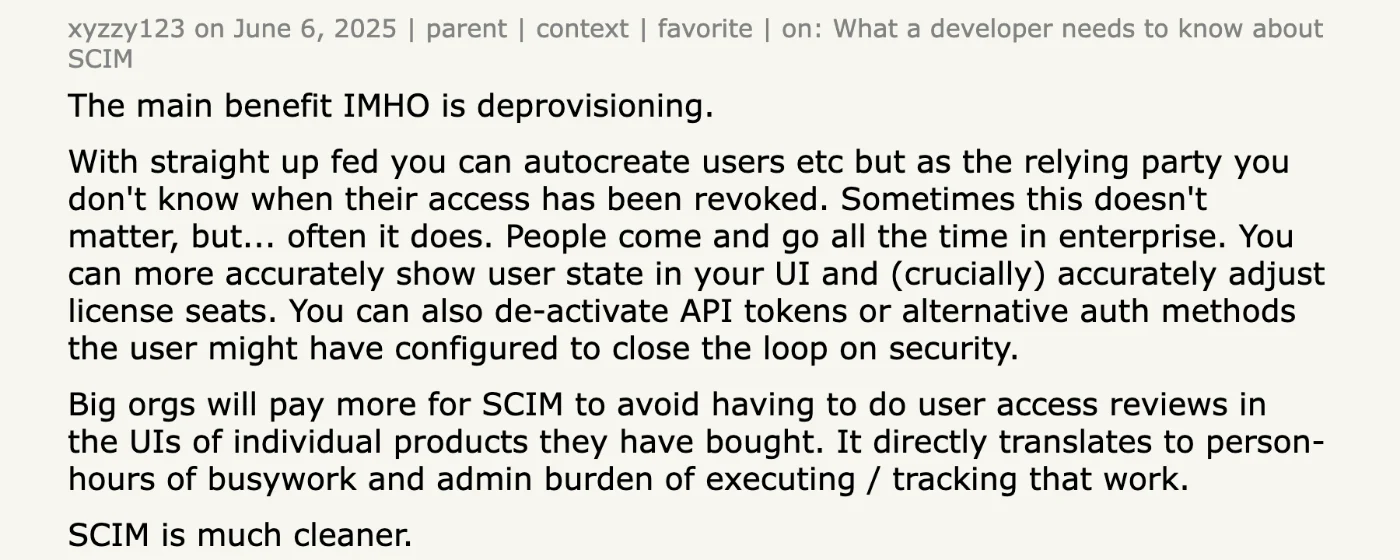
You can more accurately show user state in your UI and (crucially) accurately adjust license seats. You can also de-activate API tokens or alternative auth methods the user might have configured to close the loop on security.
How do you find zombie accounts?
The signal is activity, or more precisely its absence, and the method for reading it has three steps.
- Pull last-login or usage data from each application. Most identity providers report last sign-in through SSO. Applications with their own login report it, if at all, through their admin API or an export.
- Flag anything idle past a threshold. Sixty or ninety days is the common line, and PCI DSS sets 90 days as a requirement for in-scope systems. An account untouched for a quarter is either a zombie already or close to becoming one.
- Route each flagged account to its owner with a question and a default. Confirm it is needed, or it is disabled on a date.
Where the thresholds come from
The two thresholds in common use are not arbitrary, and neither is a security opinion. PCI DSS requires inactive accounts to be removed or disabled within 90 days for systems in scope, and the CIS Controls set a tighter line at 45 days where the platform supports it. NIST leaves the period to the organization and requires that one be defined, which is the part most policies skip. A written threshold is what turns a dormancy report into a decision, because without one every flagged account is a conversation.
Why activity data is uneven
The constraint is that activity data is uneven, and the unevenness runs in the wrong direction.
| Source of activity data | What it shows | What it misses |
|---|---|---|
| Identity provider sign-in logs | Last SSO login per application | Local logins that bypass SSO; API use; applications not behind SSO |
| Application admin API or report | Last activity inside the application | Applications with no usage reporting, often the older or lower-tier tools |
| Licence or billing export | Seats assigned | Whether anyone used the seat |
Some applications report last login cleanly, and others expose nothing useful at all. The second group tends to hold the tools where stale accounts collect. Microsoft's guidance on managing inactive user accounts shows what the good case looks like: a last sign-in timestamp on the account, queryable across the tenant. The applications with no equivalent are usually the older ones, the lower-tier plans and the internally built tools, which is the same set that collects the most stale accounts. Where the data exists, idle time is the clearest cleanup signal there is. Where it does not, zombies have to be caught by reconciliation and review instead.
Iden flags dormant accounts from last-activity data pulled from each connected application and lists them in the Action Center beside orphaned and overprovisioned accounts. Each row carries the licence cost of the idle seat, so the cleanup shows up as a number finance recognises, and resolving the row reclaims the seat. The feature behind it is Licences assigned against licences used.
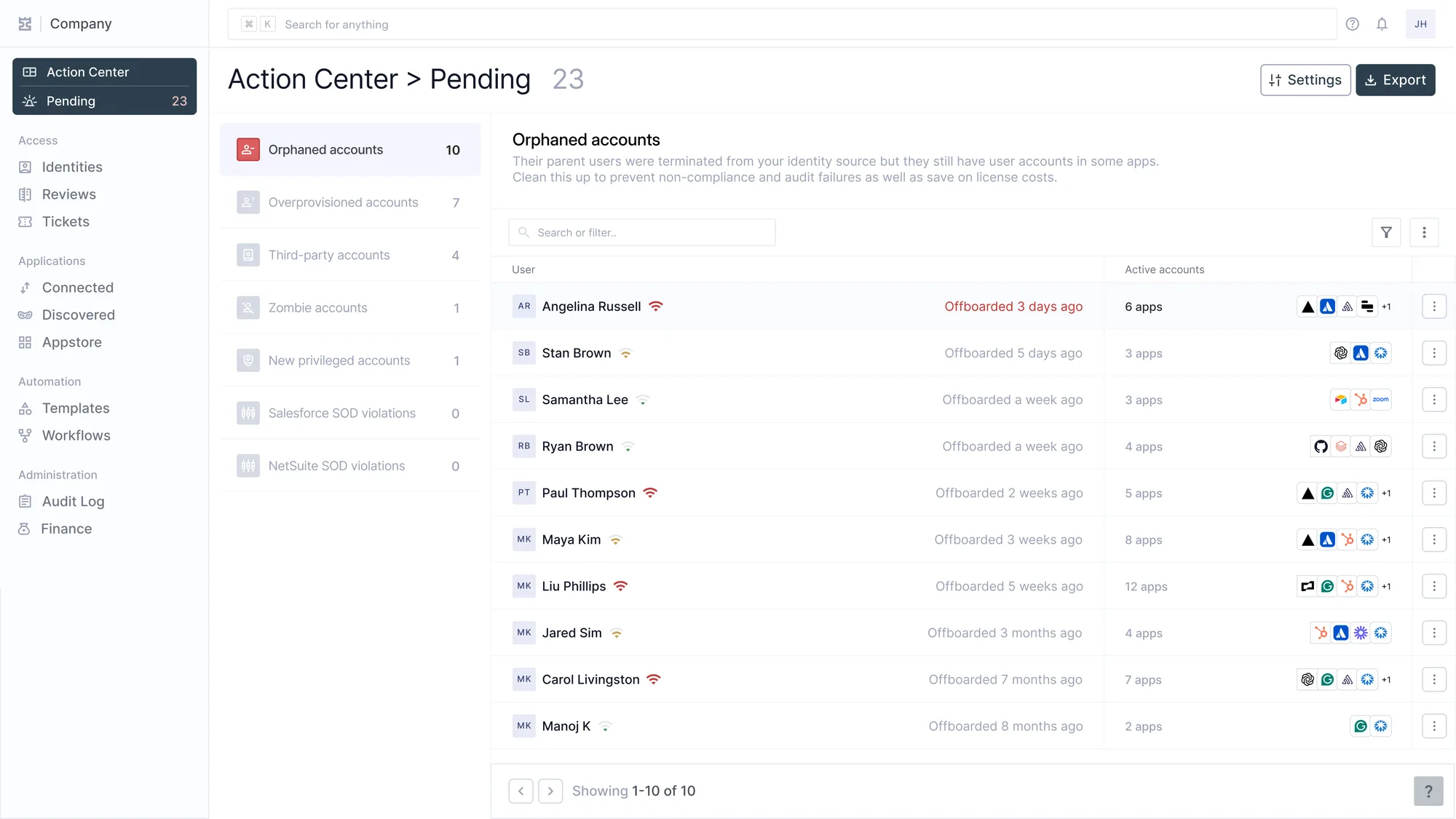
Findings als Eingang. Links Kategorien und Anzahl, rechts die Warteschlange, zwei Kategorien stehen schon auf null. Angelina wurde vor drei Tagen offgeboardet und hält noch sechs Applikationen.
Does SCIM catch zombie accounts?
No, and the reason is in the specification rather than in any vendor's implementation.
What the protocol knows
RFC 7643 defines the User resource that SCIM synchronises, and its attributes describe who a person is and whether the account should be enabled. There is no attribute for when the account was last used, because usage is not what the protocol was built to carry. A current employee's dormant seat in a tool they stopped opening is therefore perfectly in sync and perfectly wasted, and every conformance test the vendor runs will pass.
What has to be collected separately
Catching zombies takes activity data from the application itself, which is a separate pull from provisioning and often a separate permission. Two practical consequences follow from that separation. The pull has to happen on a schedule of its own, because dormancy is a fact about a period rather than a state that changes with an event. And for applications without SCIM the activity pull is usually the only signal available at all, collected over the application's API or from its console, which makes it the first integration worth building rather than the last.
How do you prevent zombie accounts?
Zombie accounts are what accumulates when access is never tied back to need. The prevention is the lifecycle working as designed, plus one design choice.
- Access is removed when people leave, across every application, so a leaver's seats do not become zombies.
- Access is adjusted when people move, so the seat from the old role is reclaimed rather than left idle.
- A recurring review flags idle accounts before they are forgotten, and its rejections execute the removal.
- Time-bound access closes the remaining path, because a seat granted for a project with an expiry date cannot go dormant and linger.
Why time-bound access is the design choice
The first three habits are corrections applied after a grant has already gone stale. Time-bound access removes the possibility instead, by making expiry the default state of a grant rather than an action somebody has to take. The trade is real and worth naming, because expiring access interrupts people who still need it. The pattern belongs on the grants that were exceptional in the first place: the project seat, the elevated role, the tool one team asked for once. Applying it to the birthright bundle produces a queue of renewals and no security benefit.
The two-date policy
The value of writing the two dates down is that it removes the per-account argument. A dormancy report without a policy produces a meeting, and a dormancy report with one produces a list of accounts that will be disabled on a date unless somebody objects. The second form is also the one that produces evidence, because the record shows a decision applied consistently rather than a judgement made account by account.